snow the fox
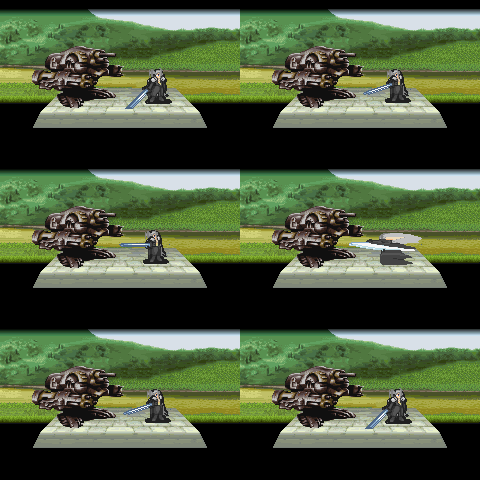
my new sprite animation
The gun tank should probably move the other way when it gets hit, since that is the way that the force of the attack would push it. It doesn't make much sense for it to move forward and down when if anything a thrusting attack would move it back, and possibly lift it.
The shakiness of the guy, who looks to be a sephiroth type of guy could have easily been solved if you were using photoshop and zoomed in to an extreme where you could see a pixle that stands out a little, and could use that as a marker for where everything should be.
As an example, in the animation that I did, I used a part where the dusty road because grass for a pixle, and used that as a marker for where the shadow should end when he returned to idle, and just used layers on top of layers to make sure that everything lined up right.
If you aren't using photoshop, and are using something like paint, then you should still be able to line things up right, if you use markers as to where everything should be.
The fact that this guy has his hair lift, or has a motion blur behind him is actually one of the first things that caught my eye as wrong. The motion blur/hair moves further back than he was originally standing, that shouldn't be like that. This is easy to solve in two ways, either drastically reduce the motion blur, or hair trail, or an even simpler solution, of having him move forward more on his thrusting attack, to give the motion blur/hair movement more justice. If you are having trouble with the ammount of space that he has to move, because it is limited, I'd suggest moving his idle position back a little bit so that he has enough space to move properly.
There is also a motion blur on the sword that doesn't look right. It looks like just before he makes his thrust he decides to pull back and make it a super speed slash instead, because the motion trail of the sword goes all the way across his body. I'm not sure this might actually be solved at the same time that the rest of the motion blur problems are solved.










 Reply
Reply