|
|
|
|
|
|
|
|
|
 Posted: Fri May 05, 2006 4:05 am Posted: Fri May 05, 2006 4:05 am
|
|
|
|
|
|
|
|
|
|
Posted: Wed May 17, 2006 1:06 pm
You should tell us how to 'splice' sprites together....
|
 |
|
|
|
|
|
|
|
|
|
|
|
|
|
|
|
|
Posted: Wed May 17, 2006 6:27 pm
Seth_God You should tell us how to 'splice' sprites together.... umm, such as?
|
|
|
|
|
|
|
|
|
|
|
|
|
|
|
Posted: Thu May 18, 2006 2:25 pm
Barsona Seth_God You should tell us how to 'splice' sprites together.... umm, such as? such as taking the monster wolve claws from feplanet and adding wings. or taking peices of other sprites and adding them to make a new sprite... (btw the lion thing = this 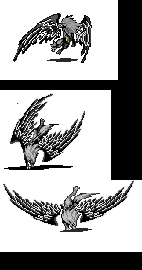 Please excuse the jumpyness) How about teaching us how to use coffe cup gif animators or another type?
|
|
|
|
|
|
|
|
|
|
|
|
|
|
|
|
|
|
Posted: Thu May 18, 2006 5:16 pm
A good animator is Serif Photoplus 6. Google it and download it. It is free!
|
|
|
|
|
|
|
|
|
|
|
|
|
|
|
Posted: Fri May 19, 2006 3:20 pm
Seth_God Barsona Seth_God You should tell us how to 'splice' sprites together.... umm, such as? such as taking the monster wolve claws from feplanet and adding wings. or taking peices of other sprites and adding them to make a new sprite... (btw the lion thing = this Please excuse the jumpyness) How about teaching us how to use coffe cup gif animators or another type? well, the thing is, most animators are PC only. As well, I am still learning short cuts to better my photoshop skills. However, I can see in some of your animation, that you have a size issue. Try making the canvas of all the sprites the same size
|
|
|
|
|
|
|
|
|
|
|
|
|
|
|
|
|
|
Posted: Fri May 19, 2006 9:51 pm
Barsona Seth_God Barsona Seth_God You should tell us how to 'splice' sprites together.... umm, such as? such as taking the monster wolve claws from feplanet and adding wings. or taking peices of other sprites and adding them to make a new sprite... (btw the lion thing = this Please excuse the jumpyness) How about teaching us how to use coffe cup gif animators or another type? well, the thing is, most animators are PC only. As well, I am still learning short cuts to better my photoshop skills. However, I can see in some of your animation, that you have a size issue. Try making the canvas of all the sprites the same size Aa sou desu ka? Domo Arigato
|
|
|
|
|
|
|
|
|
|
|
|
|
|
|
Posted: Tue Jul 04, 2006 8:40 pm
Here's a good source for megaman sprites, you might have overlooked, I've been using it for years, and it has quite a large range. Sprites Inc.One more thing, Seth try making more slides, then just three of them, it'll make the animation more smoother. If you're using Photoshop remember to use the magic wand to get rid of the white splotches around the actual figure.
|
|
|
|
|
|
|
|
|
|
|
|
|
|
|
|
|
|
Posted: Mon Sep 11, 2006 6:36 pm
Is there a Image Hosting site besides Photobucket and Imageshack?
|
|
|
|
|
|
|
|
|
|
|
|
|
|
|
Posted: Sat Sep 16, 2006 4:11 pm
I got the best animator of them all . . . . adobe photoshop + adobe image ready!!
(and yes, I used to use this one until I notice photobucket was more convineint in some websites, . . . . . . www.tinypic.com)
|
|
|
|
|
|
|
|
|
|
|
|
|
|
|
|
|
|
Posted: Sat Sep 16, 2006 5:30 pm
IT WORKS!!!!!!!! biggrin biggrin
|
|
|
|
|
|
|
|
|
|
|
|
|
|
|
Posted: Thu Oct 05, 2006 2:20 pm
If I made a tutorial, could it be posted here?
|
|
|
|
|
|
|
|
|
|
|
|
|
|
|
|
|
|
Posted: Thu Oct 05, 2006 3:02 pm
Roselite Blade If I made a tutorial, could it be posted here? tutorial of what? I would post it some where with all the tutorial
|
|
|
|
|
|
|
|
|
|
|
|
|
|
|
Posted: Thu Oct 05, 2006 3:34 pm
Barsona Roselite Blade If I made a tutorial, could it be posted here? tutorial of what? I would post it some where with all the tutorial How I recolor gifs.
|
|
|
|
|
|
|
|
|
|
|
|
|
|
|
|
|
|
|