




Demon Friendship Quests
These Quests are small Requests from your Demons stored in your COMP. The Tasks they are asking for can vary from killing / negotiating with other Demons through defeating Field bosses or create Demon Crystals to simple ones like open a specific type of Plasma. Of course every time you complete one you get some rewards from your Demon (usually a decent amount of xp / a small amount of macca / some items and a Codename piece).
Note: Only Demons with Good Friends or higher Friendship will give you these Quests and to receive Quests for Special Code names you will need at least Open Hearts Friendship with your Demon
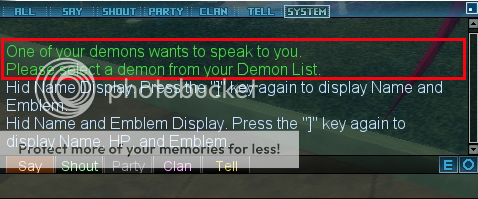
If you have a Demon in you COMP with the necessary Friendship level then you will see a message in your Chat-Window:
You will see this symbol on your Menu also:
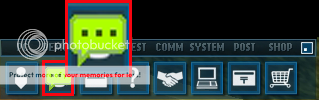
Click on it and select Demon List. You will acess then the List of the Demons stored on your COMP and see a similar blue Icon next to every Demon who can offer Demon Friendship Quest for you.
Note: You have 3 attempts / Day with the Quests you give up on. Once you are accepted your 3rd DFQ you have to wait til tomorrow 1AM PST / 8AM GMT to take on the new Challenges.
Select a Demon whose Quest you want to complete and click on his Icon to proceed.

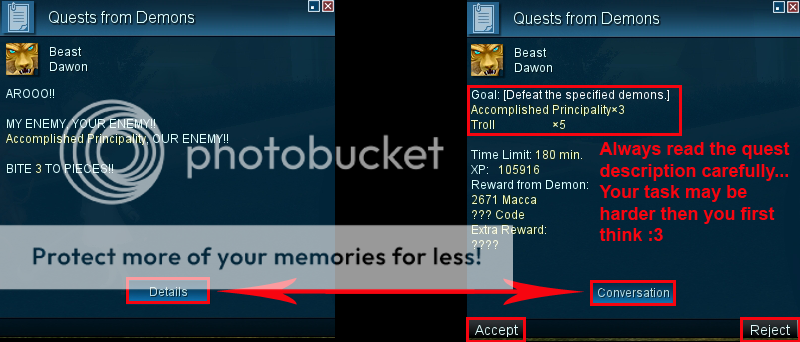
A new window will appear where the Demon explains the situation shortly and asks you to help. Click on the Details button to see the Quest's Details (Objectives / Time Limit / Possible Rewards). Click on the Accept button to start the Quest or on the Reject to Refuse your Demon's request.
Once you accepted the quest the Icon will change next to your Demon indicating you are doing that Demon's quest at the moment.
Note: You can only have one active DFQ so the other Demons' Icons will be grayed out til you won't finish or give up on your current one.
Click on this Icon to access the Quest's Status Window.

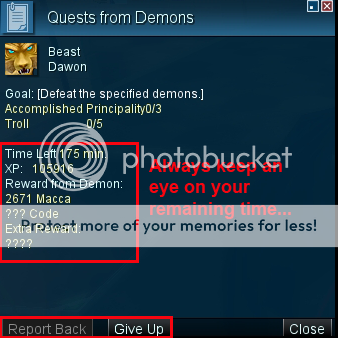
You can check the objectives of the Quest in this Window. You can also see your Progress and how much time do you have remaining. There are two buttons on the bottom: Report Back (which is grayed out for now til you won't complete the Quest Objectives) and Give Up.
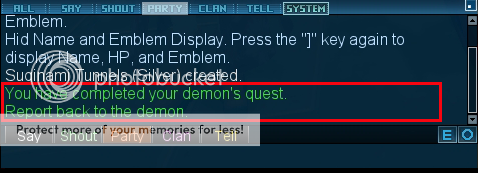
You have to complete every Objectives of the Quest before your Time runs out. Once you are successfully you will get a message in your Chat Window:
Note: You can be in a Party during the Quest but your Party Members can't help you in your Quest in any way. The Quests' Objectives aren't shared and only for you so it won't count if your Party Members are giving the finishing blow to your targets / negotiate successfully with the Demons / opening Plasmas / Crystalizing Demons... etc.
Important !!! : Be careful and avoid those Quests which you can't complete cause of the lack of necessary Skills / Expertises
Open up your Quest's Status Window by clicking the Icon next to your Demon on your Demon List and click on the Report Back button which should be active now.
A confirmation message will appear on the middle of your screen:

Your Quest Status Window will change also showing all your rewards.
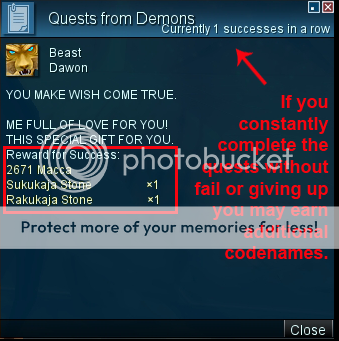
Once you Close the Results you will get another message and a word to your Codename Collection:

These Quests are small Requests from your Demons stored in your COMP. The Tasks they are asking for can vary from killing / negotiating with other Demons through defeating Field bosses or create Demon Crystals to simple ones like open a specific type of Plasma. Of course every time you complete one you get some rewards from your Demon (usually a decent amount of xp / a small amount of macca / some items and a Codename piece).
Note: Only Demons with Good Friends or higher Friendship will give you these Quests and to receive Quests for Special Code names you will need at least Open Hearts Friendship with your Demon
If you have a Demon in you COMP with the necessary Friendship level then you will see a message in your Chat-Window:
You will see this symbol on your Menu also:
Click on it and select Demon List. You will acess then the List of the Demons stored on your COMP and see a similar blue Icon next to every Demon who can offer Demon Friendship Quest for you.
Note: You have 3 attempts / Day with the Quests you give up on. Once you are accepted your 3rd DFQ you have to wait til tomorrow 1AM PST / 8AM GMT to take on the new Challenges.
Select a Demon whose Quest you want to complete and click on his Icon to proceed.
A new window will appear where the Demon explains the situation shortly and asks you to help. Click on the Details button to see the Quest's Details (Objectives / Time Limit / Possible Rewards). Click on the Accept button to start the Quest or on the Reject to Refuse your Demon's request.
Once you accepted the quest the Icon will change next to your Demon indicating you are doing that Demon's quest at the moment.
Note: You can only have one active DFQ so the other Demons' Icons will be grayed out til you won't finish or give up on your current one.
Click on this Icon to access the Quest's Status Window.
You can check the objectives of the Quest in this Window. You can also see your Progress and how much time do you have remaining. There are two buttons on the bottom: Report Back (which is grayed out for now til you won't complete the Quest Objectives) and Give Up.
You have to complete every Objectives of the Quest before your Time runs out. Once you are successfully you will get a message in your Chat Window:
Note: You can be in a Party during the Quest but your Party Members can't help you in your Quest in any way. The Quests' Objectives aren't shared and only for you so it won't count if your Party Members are giving the finishing blow to your targets / negotiate successfully with the Demons / opening Plasmas / Crystalizing Demons... etc.
Important !!! : Be careful and avoid those Quests which you can't complete cause of the lack of necessary Skills / Expertises
Open up your Quest's Status Window by clicking the Icon next to your Demon on your Demon List and click on the Report Back button which should be active now.
A confirmation message will appear on the middle of your screen:
Your Quest Status Window will change also showing all your rewards.
Once you Close the Results you will get another message and a word to your Codename Collection: