

Welcome to Gaia! ::

Anonymous Head Quarters [JOIN TODAY]

Back to Guilds

Anonymous Gift Giving Head Quarters 

Tags: Anonymous, Plan, Head Quarters, Gold, Gifts 

Reply Hopes Guide's
HW Guide #4: Anonymously Gift Giving (Special Edition)

Quick Reply

Enter both words below, separated by a space:

Can't read the text? Click here

Submit

Do you like his guides?
Yes!! I love them <33
0%
 0%  [ 0 ]
No :(
0%
 0%  [ 0 ]
Total Votes : 0


Soul Hope
Crew

PostPosted: Thu Jul 16, 2009 8:59 pm


User Image

User Image

Hello. How is everyone today? Well, today I present to you this Special Edition Guide. Enjoy.

Alright, let's say you see a super amazing person on Gaia or if you just so happen to be in a Anon Gift Giving Thread and you want to give out a Gift without being known.
Well, today I will show you the basics on "Anon" Gift Giving.

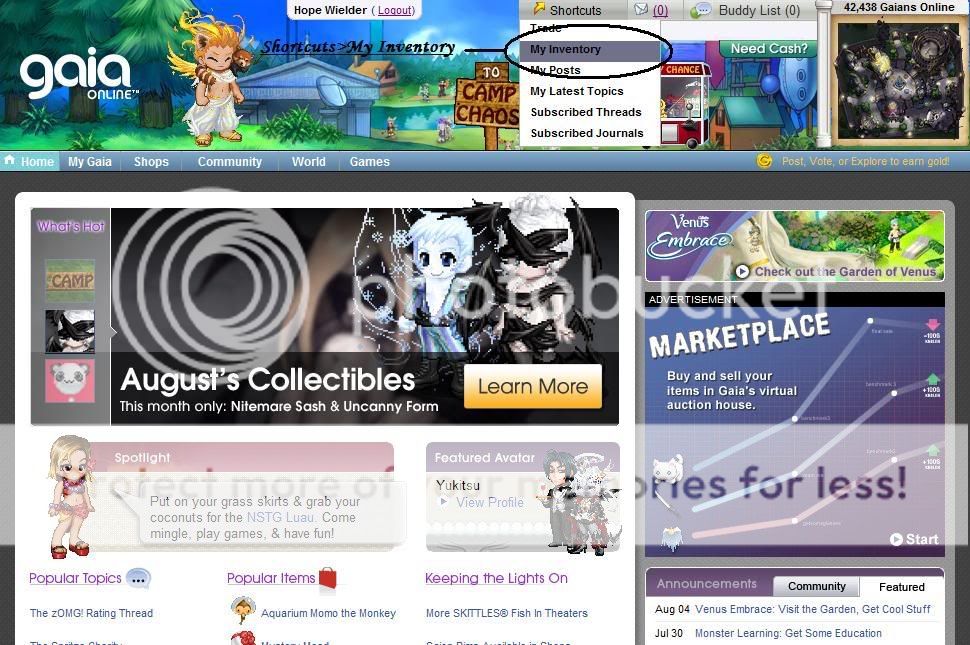
First you have to go to your Inventory. To do so, do the following:

Shortcuts>My Inventory

That's it. This is the first step. Let's keep on going, shall we?
PostPosted: Thu Jul 16, 2009 9:01 pm


User Image
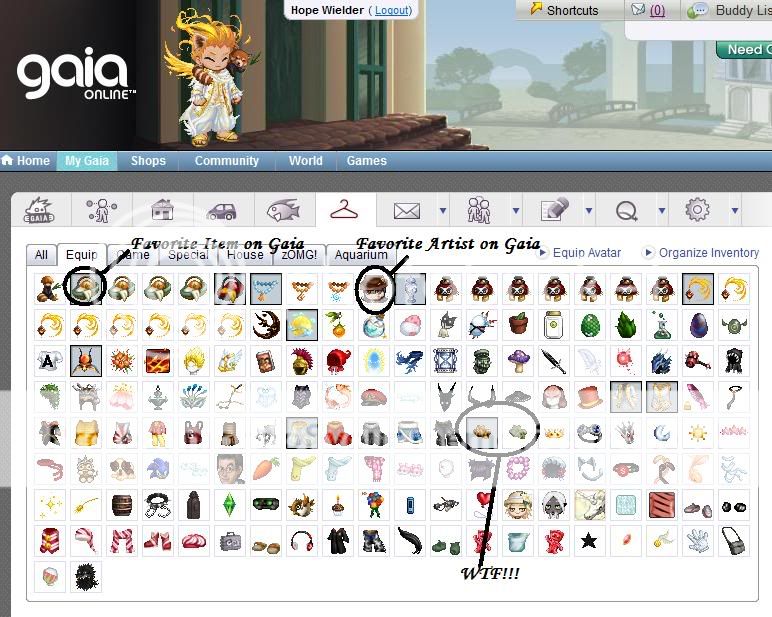
After your Page loads, you should be looking at your Inventory or Invo for short.

This really isn't a step, but I just wanted to show you what you should be looking at.

Let's move on.

Soul Hope
Crew


Soul Hope
Crew

PostPosted: Thu Jul 16, 2009 9:05 pm


Alright, stop looking at all of your Items and find the one that you're going to "Anon" Gift.

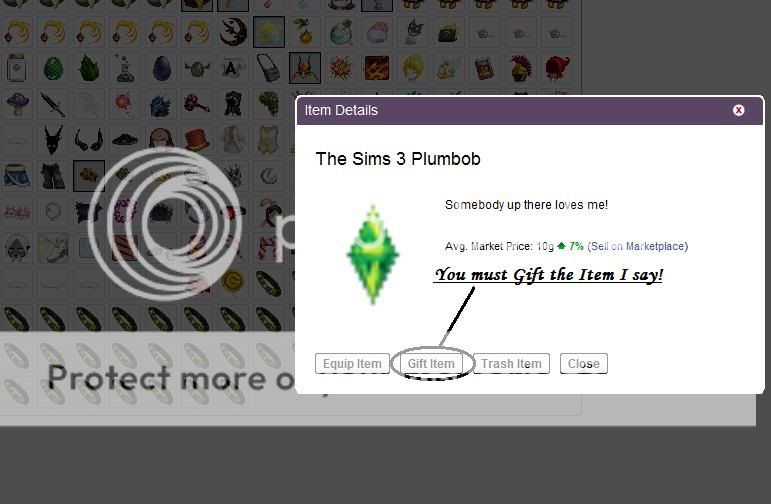
Found it? Right on! Now click on the Item. Wait a second and you should be now looking at this page:

User Image

As you can see, there are 4 options that you can chose from. I won't go over them today since this Guide is all about Gift Giving.

Click on the Option that says, "Gift Item". Don't trash it because you will loose the Item forever!

Alright, let's move on!
PostPosted: Thu Jul 16, 2009 9:20 pm


User Image

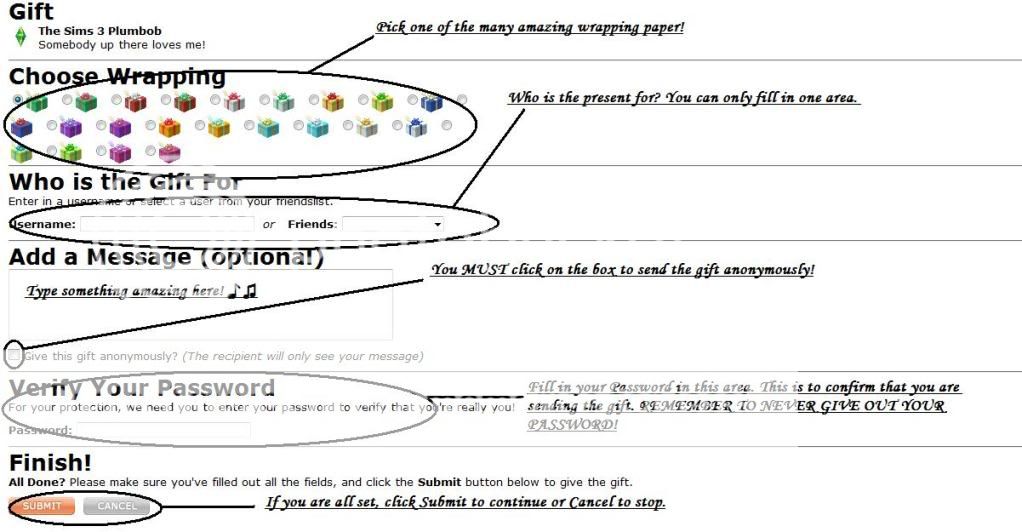
After clicking on the "Gift Item" option, you should be directed to a Page that looks like the Picture above.

This step is the most important!
First of all, you can pick a nice wrapping to send the Gift in. Look at them all!
They look so nice. heart

Next, you have to select who you're sending the Gift to. You can either type in their Username or you can select them from your Friend List if they are on there.
Note: You cannot fill in both areas even if it is the same user. Gaia will scream at you.

After you select who you want to send the gift to, you get to type in a message.
This is optional, but it make the gift even better.

Now do you see that little box right under where you typed in your message?
Click on that to send the gift anonymously!

Now you have to verify your password. Type it in and you're all set to go.


Once again, don't ever give out your Password to anyone!

And after that's done, just click on "Submit". That's it. Now all you have to do is confirm the information. Onto the next Step!

Soul Hope
Crew


Soul Hope
Crew

PostPosted: Thu Jul 16, 2009 9:26 pm


User Image

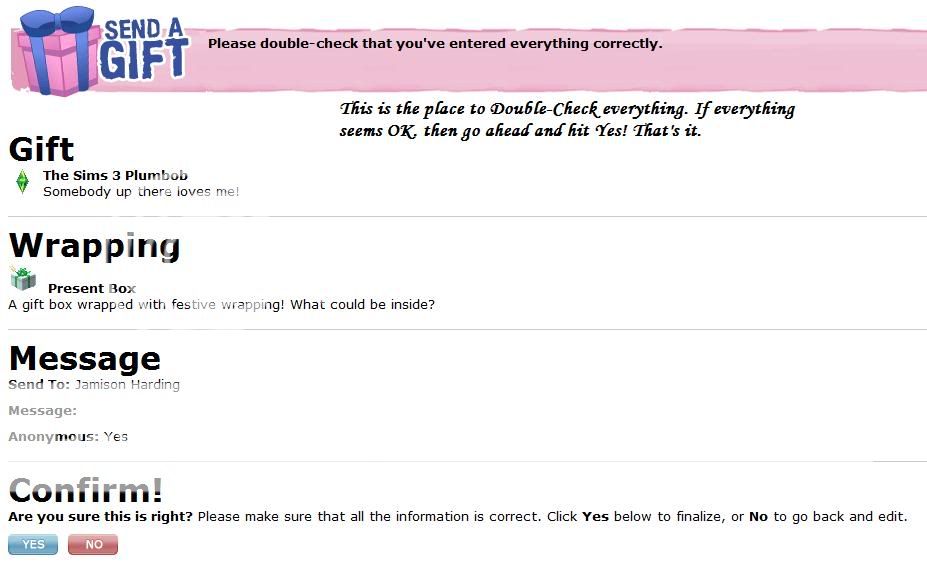
Alright, all you have to do for this step is look over all the information.

Make sure it is the right user that you're sending the Gift to.
I mean, it's not really going to happen, but what if you wanted to send a Gift to your friend Max-1150 and you type in Max-1151.

What happens if there really is a user with the Username Max-1151? You just sent the Gift to that user instead of your friend.

So, verify the Info. Once you are 100% sure that everything is alright, click on "Yes".

And that's it. That's how you send a Gift anonymously. Alright, I have to go to sleep. Have a great time Anon Gift Giving, enjoy Gaia.
Reply
Hopes Guide's

 
Manage Your Items
Other Stuff
Get GCash
Offers
Get Items
More Items
Where Everyone Hangs Out
Other Community Areas
Virtual Spaces
Fun Stuff
Gaia's Games
Mini-Games
Play with GCash
Play with Platinum