







Please provide the following information the best you can.
Server:
Date/time:
Channel:
Location:
Player(s) being reported:
Description of the issue:
Evidence:
Evidence is required in order for any action to be taken. It must be accurate and verifiable evidence to back up your accusations. It can be chat logs or screen shots.
If you are going to use chat logs they are not applicable when copy and pasted into the forums. You must upload them to a third party website such as megaupload.com then provide the link to the download in your report.
Your chat logs are located at Local Disk (C):/AeriaGames/MegaTen/ChatLog/Cerberus
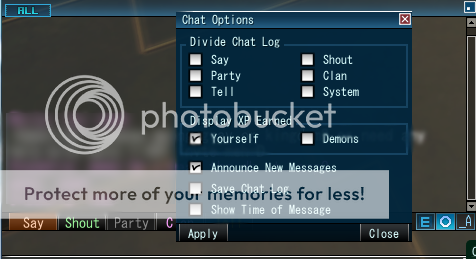
To save your chat logs, you must tell the game to do so. Press the O found on the chat window, and check off "Save Chat Log", like seen below. The logs will now save into the folder mentioned above.
If you are going to post screen shots, do NOT edit them in any shape or form. Post them in their original state. You will have to upload them to a third party site such as Imageshack.com or Photobucket.com and then post the link within the
 Terms of Service and Fair Play Rules.
If you do not feel comfortable posting your report publicly, you can also do it through the Contact Us link.
And lastly, these are very important as well so please be mindful of them as well!
When replying to a post:
* Only post if you have further information or evidence to add to the report or
* Are helping the creator fill out the report form correctly.
* Stay on topic.
* Keep any argument or disagreement you may have with another person (or the person you're reporting) private. Keep the thread for the report only.
* Be respectful to any other players who post in your report thread.
Don't panic if a Mod, GM, or GS doesn't get to your report right away. They will flag it or post in it as soon as they can.
Reporting Gold Sellers:
This is the only time we will allow you to edit your screenshot. Please black out the name of the website (but please leave it obvious that someone is gold selling).
Otherwise, the format is identical to what is above.
