I was wondering if anyone can help me. I was to make a go stone on Photoshop, but I haven't been that succesful. The farthest I have gotten in the production is a drop and inner shadow. confused Please someone help me.
Posted: Fri Sep 14, 2007 12:03 pm
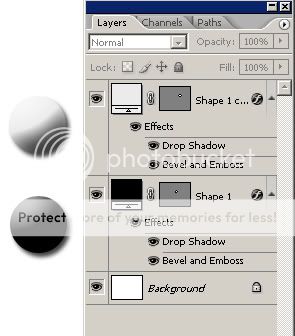
er.. use bevel and emboss on the layer, and then add a drop shadow.
cipheralex Crew
Offline
GwydionAE Crew
Antique Cat
Offline
Posted: Fri Sep 14, 2007 12:39 pm
::cries:: ::wishing she had photoshop... and a computer good enough to run it::
Posted: Fri Sep 14, 2007 8:07 pm
Very nice cipheralex! I'm deeply sorry, but I was extremely vague when I asked for help. sweatdrop I actually needed help with stones at a side view. I have white's stone 'done', but now black will be a challenge. I will still use you airial view stone because I love how it looks. wink
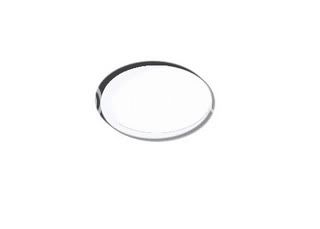
Here's white, and I got it just by luck.
Sukouto_Shindo
Offline
cipheralex Crew
Offline
Posted: Sat Sep 15, 2007 4:20 pm
umm.. sukouto.. ^^;; if you want a side view of the stone.. then you need to have the bottom half of the stone in shade. so what you got it not quite right .. o.o;; I will give an example when I get some time.. but right now. food... >.< :: have not eaten all day ::
Posted: Sun Sep 16, 2007 4:12 pm
cipheralex
umm.. sukouto.. ^^;; if you want a side view of the stone.. then you need to have the bottom half of the stone in shade. so what you got it not quite right .. o.o;; I will give an example when I get some time.. but right now. food... >.< :: have not eaten all day ::
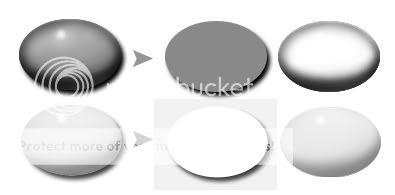
I'm being stupid at the moment. sweatdrop The angle I'm trying to get at is something like this. Again, sorry for being stupid. redface
Sukouto_Shindo
Offline
cipheralex Crew
Offline
Posted: Tue Sep 18, 2007 12:48 pm
ah.. well it still comes down to shading thou.
the finished one is on the left side, the right side is the 2 layers one with the drup shadow, one with the shading on top of the stone to make it look 3D. hope this helps.
Posted: Sun Sep 30, 2007 2:25 pm
cipheralex
ah.. well it still comes down to shading thou.
the finished one is on the left side, the right side is the 2 layers one with the drup shadow, one with the shading on top of the stone to make it look 3D. hope this helps.


 Reply
Reply