Welcome to Gaia! ::

The Runescape Guild

Back to Guilds


Tags: Runescape, skilling, non-drama, helpful 

Reply The Runescape Guild
Problems Loading Runescape? -- Problem Solved Goto Page: [] [<] 1 2 3 [>] [»|]

Quick Reply

Enter both words below, separated by a space:

Can't read the text? Click here

Submit

Ironclad Pen

PostPosted: Tue Feb 02, 2010 7:51 pm


80 KB on the dot.

I really don't want to do a restore, I just added a bunch of crap
these past couple days that I don't want to loose.

Running IE as an admin did nothing. It didn't even remake the folder.
PostPosted: Tue Feb 02, 2010 7:57 pm


80 KB. I see. Mine is 128 KB, so something doesn't want to write.

And I understand, plus it's not like a System Restore would definitely fix it, so that's why I really didn't recommend it.

So, playing on Unsigned mode on Internet Explorer Running as an Admin didn't let you play?

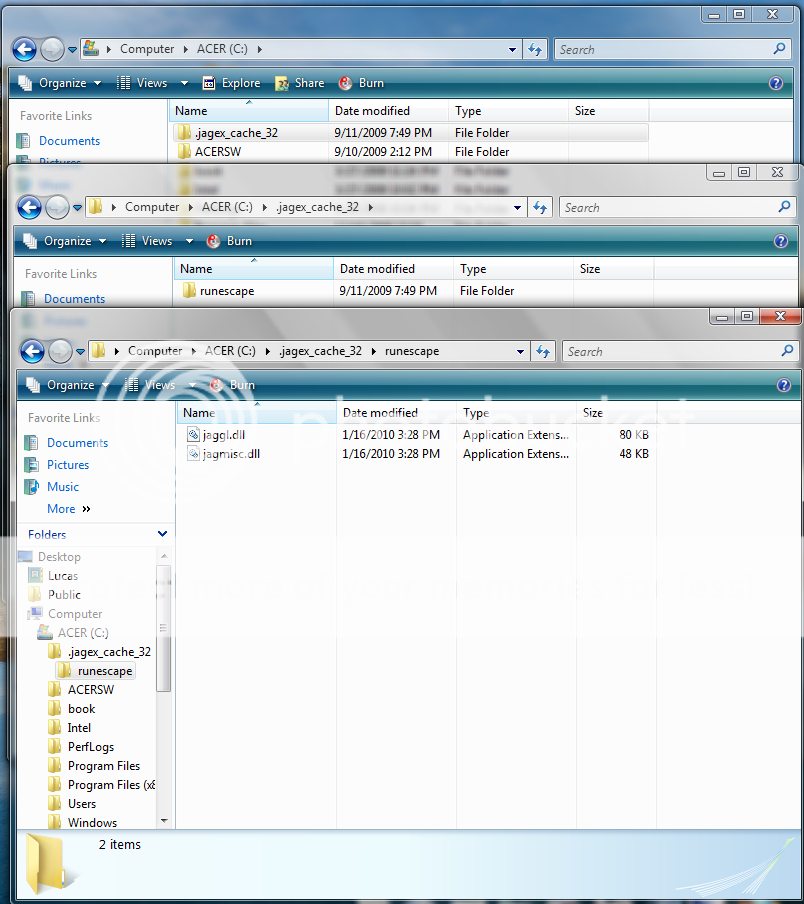
This is what mine looks like...

User Image

Anything different? File Size, or maybe something is missing?

EDIT: I'm about to log off, exam at 6:30 tomorrow, and it's 11:00 here. I will be on as soon as I get from school tomorrow to see if I can help you out. If you find anything out, or think you should post something, do it, I'll look at it tomorrow. Good night, and take care Liz.

Aicas


Ironclad Pen

PostPosted: Tue Feb 02, 2010 8:02 pm


I can play in Unsigned mode on FF and IE, just not regular mode.

Yes, I didn't have the Runescape folder.
It went;

C: - rscache - .jagex_cache32 - *some other folder* - *a file I couldn't open*
PostPosted: Tue Feb 02, 2010 8:04 pm


Okay, I'll look at the source code of the page tomorrow to see what the difference is between the Un-Signed and Signed version, I'll probably have a solution for you by then. Take care. =].

EDIT: Try re-creating it but this time re-create it using /rscache note c:rscache

Aicas


Ironclad Pen

PostPosted: Tue Feb 02, 2010 8:05 pm


Thanks.
This is starting to really annoy me.
PostPosted: Wed Feb 03, 2010 6:56 am


ROFL, my RS Cache is over 8MBs.

Liz, deleting the cache and forcing RS to create a new one is what I've seen JMods suggest often in situations like this. You will lose any preferences, and be forced to redownload RS again much like the unsigned. Also, when deleting the cache that you guys are currently looking at. Also go into C:usersyour_username and delete the jagex_runescape_preferences.dat.

I for some reason have two of those there. Hmm, between that and the 8MBs of cache, I think Jagex is trying to tell me something... lol

You never get to the applet, do you? To the loading screen so that you can try entering Safe Mode?

Airazor
Captain

Hotheaded Rogue


Ironclad Pen

PostPosted: Wed Feb 03, 2010 11:09 am


I don't have anything related to Runescape on my C: other than
my own private screenies.

I click Play Now.
It loads the Game Code to 100% then sends me off to the page
in my first post.
PostPosted: Wed Feb 03, 2010 1:37 pm


Try clicking the letter "S" for it to load in safe mode as soon as you click play now.

Aicas


Ironclad Pen

PostPosted: Wed Feb 03, 2010 1:43 pm


Didn't change anything.

I think I might just do a system restore later,
then update Firefox, and Java. See if that fixes anything.
PostPosted: Wed Feb 03, 2010 2:02 pm


Okay, if it doesn't tell me. And post your PC specs here, I'll ask a J-Mod about it if you'd like.

Aicas


Ironclad Pen

PostPosted: Wed Feb 03, 2010 3:48 pm


Didn't do s**t, although I now have a .jagex folder.

User Image

After I did the restore, I used IE to get into Runescape. It got me
to the what should have been the loading screen expect it was just
a blank white one.

I reinstalled the most up to date Firefox and Java.

And I still can't play.

Computer Specs:

Windows 7 Enterprise
Intel Core Duo CPU e7400 2.8 GHz
2GB total Ram
32 bit OS
Asus P5KPL-AM SE Motherboard.

No graphics card, I've been using the motherboard one.

EDIT:
So I just had an idea.
I tired logging in to Runescape on my mothers computer and was
able to log in perfectly fine.

She however is running Windows XP.

Jagex needs to pull their heads out of their asses.
PostPosted: Wed Feb 03, 2010 5:21 pm


Liz, did you happen to update Java to the latest version sometime before having this problem? Sometimes when the newest Java is released, it has some problems with RS, and Jagex has to try and make them compatible. Downgrading the Java may help.

I think the current version is 6.18. I still run fine on 6.11.

Airazor
Captain

Hotheaded Rogue


Ironclad Pen

PostPosted: Wed Feb 03, 2010 5:47 pm


I only updated Java after I couldn't get on Runescape.
PostPosted: Wed Feb 03, 2010 6:35 pm


Hmm, did you ever find the Jagex Preferences DAT in your username's folder?

25-26-207-60321906

This guy had the same problem as you, and deleting all of the Jagex related files together then starting RS new got his to work. There's that other guy in that thread who also has Windows 7 who found his folder hidden.

Airazor
Captain

Hotheaded Rogue


Ironclad Pen

PostPosted: Wed Feb 03, 2010 7:19 pm


Air...
I am coming to Canada.
Hunting you down.
And then ******** you until kingdom come. heart
Reply
The Runescape Guild

Goto Page: [] [<] 1 2 3 [>] [»|]
 
Manage Your Items
Other Stuff
Get GCash
Offers
Get Items
More Items
Where Everyone Hangs Out
Other Community Areas
Virtual Spaces
Fun Stuff
Gaia's Games
Mini-Games
Play with GCash
Play with Platinum