Welcome to Gaia! ::

Did you find this helpful?

Yes 0.51902173913043 51.9% [ 955 ]
No 0.13260869565217 13.3% [ 244 ]
POLL~! 0.34836956521739 34.8% [ 641 ]
Total Votes:[ 1840 ]
1 2 3 ... 14 15 16 >

1,750 Points
  • Person of Interest 200
  • Gaian 50
  • Autobiographer 200
User Image

User Image


Post 1: Intro
Post 2: Current Issues
Post 3: Getting Started
Post 4: Basic Control and Strategies
Post 5: Buttons and Options
Post 6: Bonus Items~!
Post 7: FAQ's
Post 8: Link List/Credits

Welcome to one of my guides, this guide is focused on the new GAIA Online Game, GAIA Jigsaw. Hope you enjoy this and if you have questions feel free to post them 3nodding

1,750 Points
  • Person of Interest 200
  • Gaian 50
  • Autobiographer 200
Current Issues


Slow Loading
This game is new and everyone is tring to load it at once.. bet you guys set some fires on the servers at GAIA HQ xd

Key
UNRESOLVED - New Issue, or no resolution has been found
PENDING - Item is being worked on
WORKAROUND- Gaia Users have found a way around the problem
RESOLVED - This problem should be resolved
FYI - Temporarily posted information that is not a problem

1,750 Points
  • Person of Interest 200
  • Gaian 50
  • Autobiographer 200
Getting Started


User ImageTo start this game go to the GAMES tab on the top and go to "GAIA Jigsaw". Or you can just click on the "PLAY" button to the left. After this you will be taken to a loading screen. You get to play an awesome fan game while the game loads. Once done you will be asked to join a server.


User Image


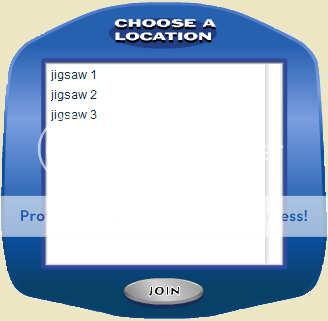
Once you start you will be asked to join a server. Just click and press "JOIN". After that simply chose a room like you did a server. If the room is labeled with a "pw" it means it has a password set by the user and you need it to join that room.

User Image


User Image

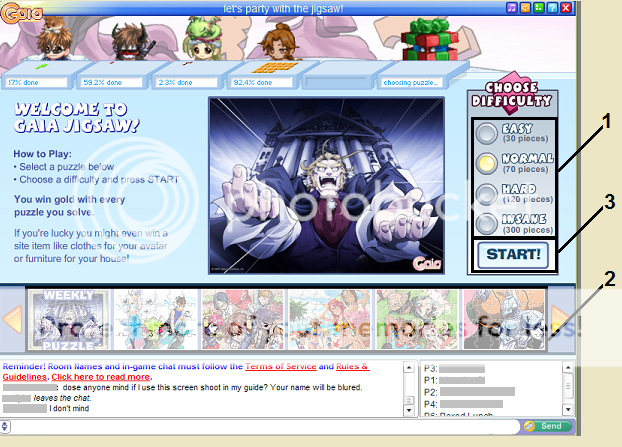
Step 1: Choose the difficulty based on the time you have and how much work you want to spend on the puzzle.


Step 2: Choose the puzzel that you like the most.


Step 3: Click "START" to play the game.

1,750 Points
  • Person of Interest 200
  • Gaian 50
  • Autobiographer 200
Basic Control and Strategies


User Image


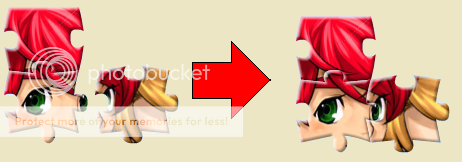
The controls of this game are very simple. You drag and drop the pieces together. Once the species have been combined they will move as one. The goal of this game is to combine ALL of the pieces. That's all there is to it.. simple eh?

User Image

Strategy 1: For this strategies try to get the outline of the puzzle because this will eliminate many easy pieces and give you a good foundation to build on.

1,750 Points
  • Person of Interest 200
  • Gaian 50
  • Autobiographer 200
Buttons and Options


User Image~ This button will allow you to save your game for the next time you play. A VERRY useful feature for those on the run. 3nodding


User Image~ Dint like your puzzle? Think its to hard/easy? Click this to go back~!


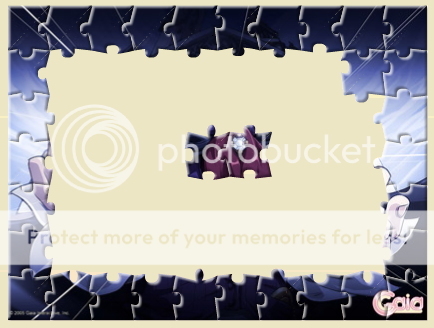
User Image~ Now what was it I was trying to make? this feature are for those people who have forgotten or are just trying to figure were about a piece goes. This feature will show a small sample of the complete puzzle you have selected.

1,750 Points
  • Person of Interest 200
  • Gaian 50
  • Autobiographer 200
Bonus Items~!


User Image


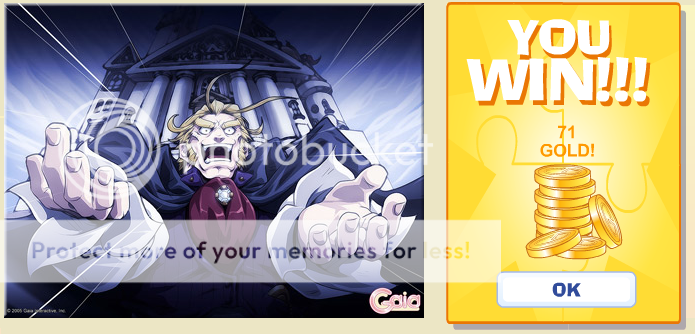
User Image At the end of a round of Jig comes the most important part... the gold. At the end of the round it will calculate your gold based on difficulty and how many times you have beat it at that difficulty lately. (36h I think). ALSO, sometimes you can find a bonus Item panel. This means that if you win this puzzle you will get an item. The bonus panel can be seen to the left if you are wondering what it looks like. Below is a list of all the items that currently can only be obtained in GAIA Jigsaw.


NOTE: It is not my fault the market links aren't correct, GAIA dose not understand less than 3 letter words...

User Image


  • User Image Framed Gaia Artwork #01
    User Image


  • User Image Framed Gaia Artwork #02
    User Image


  • User Image Framed Gaia Artwork #03
    User Image


  • User Image Framed Gaia Artwork #04
    User Image


  • User Image Framed Gaia Artwork #05
    User Image


  • User Image Framed Gaia Artwork #06
    User Image


  • User Image Framed Gaia Artwork #07
    User Image


  • User Image Framed Gaia Artwork #08
    User Image


  • User Image Framed Gaia Artwork #09
    User Image


  • User Image Framed Gaia Artwork #10
    User Image


  • User Image - Blocked by "Display Image" Settings. Click to show. Framed Gaia Artwork #11
    User Image

  • User Image Framed Gaia Artwork #12
    User Image


  • User Image Framed Gaia Artwork #13
    User Image

1,750 Points
  • Person of Interest 200
  • Gaian 50
  • Autobiographer 200
FAQ's


Q: Why aren't my pieces connecting?
A: You likely have the wrong pecies.

Quick Reply

Submit
Manage Your Items
Other Stuff
Get GCash
Offers
Get Items
More Items
Where Everyone Hangs Out
Other Community Areas
Virtual Spaces
Fun Stuff
Gaia's Games
Mini-Games
Play with GCash
Play with Platinum