Welcome to Gaia! ::


Welcome to the GAIA Towns Forum


This is a discussion forum for topics about and relating to Gaia Towns. There are just a few rules to follow for now, more may be added later once the forum has had some more time to develop.

Contents & Updates
Updates
12/19 - General Info Updated: The General Towns Info of this sticky has (finally) been updated to reflect the current status of the feature.

10/22 - Towns is temporarily down. Please see Lanzer's announcement on that here: Gaia Towns will be disabled till next week

10/12 Trash Glitch - if anyone has picked up glitched trash, please do not cash it in to the robots, as this will cause more problems. thank you for your understanding. the problem will be fixed first thing tomorrow.

because of the issue, and for other minor upgrades, all flowers and trash will not be spawning until the problem is resolved. -kaia9


10/01 - New sticky posted, old stickies removed as they are now out of date.


Contents
  • Post 1: Intro & Appropriate Conduct
  • Post 2: Thread Placement
  • Post 3: General Towns Info and User-created Resources (Guides,FAQ's,Tutorials)
  • Post 4: How to Report Abuse/Harassment/Non PG-13 Content in Towns
  • Post 5: Screenshot Tutorial


Appropriate Conduct
  • Abuse and Trolling
    Abuse of other users will not be tolerated. If someone is abusing you please use the report system to report them.

    Making threads designed to upset other users and provoke a negative response are considered trolling and are in violation of the TOS.

  • No spam
    If you wish to spam, please go to the Chatterbox.

  • Bumping
    Gaia Towns is a slow moving forum. You may bump your thread, but only if it has fallen off the first page. Please note that posting only to tell someone to stop bumping is just as much spam as their excessive bumping.

Thread Placement
  • Parties and Advertising
    Please do not advertise your house or house party in the Towns forum. This is the same as advertising a thread and is considered spam. If you wish to announce that you are having a party, please use your sig or make a thread in the Chatterbox.

  • Bars/Businesses
    Regardless of whether or not you have a home in which you are running a tavern/etc, Gaia Towns is not the appropriate place for it. Please do not advertise for your bar or business, or run one in the Towns forum. This is the same as advertising a thread and is considered spam.

    If you wish to announce that you are opening a bar and wish to recruit new people to it, please use your sig or make a thread in the Chatterbox.

    If you are running a hangout which happens to be connected to a home and plan to use that thread to hang out and to converse, please use your sig or make a thread in the Friends Chat Forum.

    If you are running a bar or tavern which happens to be connected to a home and plan to use that thread for active roleplaying, please use your sig or make a thread in Gaia Commerce.

  • Roleplays
    As with bars and businesses, roleplays which are towns-centered are no longer considered appropriate for here. If you wish to find the old roleplay threads which were centered here, please look to the Series-Related/Miscellaneous Roleplays Subforum of Barton Town.

  • Roommates/Neighbors
    If you wish to look for a room mate to share your house with or neighbors please head over to the Friends Chat forum.

  • Homes
    Topics specifically about Gaia Homes have their own forum, so if you would like to discuss interior decortaing, get your house rated or discuss anything related to homes, please head over to the GAIA Homes forum.

  • Bug Catching
    Threads about the bug catching game are welcome in GAIA Towns or in the Gaia Gaming Discussion forum.

    If you wish to buy, sell or trade bugs, please use the Marketplace Discussion subforum in the Exchange. Currently bugs can only be traded via the Marketplace, not the Bank.

  • Help with Towns and Towns glitches
    If you have a technical question about Gaia Towns please post Gaia Town Bug Report Thread for answers to common bugs or to check out the most common errors currently occuring around towns.

    Or, if you wish to make a thread use the Questions and Assistance forum. There are many knowledgable people there who would be happy to help you.

    For general information about using Gaia Towns, please refer to the many helpful guides in this forum, some of which are listed here: Basic Info/User Created Resources.

  • Help with Gaia Housing
    If you have a technical question about Gaia Homes please make your thread in the Questions and Assistance forum or Bug Reports & Technical Support. There are many knowledgable people there who would be happy to help you.

    For general information about using Gaia Towns, please refer to the many helpful guides in this forum, some of which are listed here: Basic Info/User Created Resources.

  • Feedback and suggestions to the admins
    If you have a suggestion for Gaia Towns that you want the admins to see, please post it in the Site Feedback forum. If you just want to discuss your ideas with other users then this is right place.
General Questions
  • Where can I access Towns?
    Access Towns by going to the Barton Map: http://www.gaiaonline.com/gaia/map.php and clicking on the Train Station that's just south of the exit heading towards Aekea. Please do NOT post links directly to Towns, just as you're asked not to post links directly to Fishing. If you do so, they will likely be removed.

  • How do I place my home?/How do I change my location?
    To place your home you need to first visit the Housing Commission in Aekea Town and make sure you have a permit. Then find a lot that has a vacancy, go to that lot, and walk up to a plot of land that has a for sale sign on it. When you click the sign, you're given the option to place your house there. To change the location of your home, go back to the housing comission and choose to relocate. It will cost you 2,000 gold to do so.

  • I don't have a home! How do I get one?
    There is a very good FAQ in the Homes forum that explains in detail how to get a home: Gaia Home FAQ

  • How do I know where my zipcode is?/How do I know where my home is?
    If you've placed your home, then you can find it easily by looking for the zipcode or house on the map that is highlighted in yellow, as shown in the following screenshots:
    http://img.photobucket.com/albums/v96/zhongxin/zip.jpg
    http://img.photobucket.com/albums/v96/zhongxin/zip2.jpg

  • How do I find my friends homes/zipcodes?
    If your friends have placed their homes on the map, then there are two ways for you to find them. Like finding your own home, you can look at the navigation map and search for zipcodes or houses highlighted in blue. You can also click on the status menu, go to the friends tab, and click the icon to transport you directly to the neighborhood of a specific friend.

  • Where can I buy a net?/How do I get bugs into my inventory?/What do I do with the bugs?
    The nets, used in Towns for catching bugs, can be bought from Logan at the Fishing store in Bass'ken Lake. Use the net by going into Gaia Towns and equipping it there by clicking on the net tab on the lower right corner of the towns window. Then click on a bug to try and catch it. Bugs can be transferred to your inventory by taking them to Bogie (A robot NPC) on any of the Towns fountain maps. Bugs can be exchanged at Moira's shop in Durem for inks. The inks can be used at Rina's flower shop in Durem to color your flower bouquets.

  • How do I get trash?/What do I do with trash?
    You get trash simply by finding it somewhere in Towns and picking it up. No special item is needed to collect trash. Trash is moved to your inventory by taking it to Feebie (a robot NPC) on any of the Towns fountain maps. Trash can be exchanged by talking to Peyo at the hat shop in Gambino for a variety of paper-made objects that can be equipped to your avatar.

  • Where can I buy a shovel?/How do I get flowers in my inventory?/What do I do with flowers?
    Shovels can be bought from Rina's flower shop in Barton Town. To use the shovel, equip it in towns by clicking on the shovel tab in the lower right corner of your towns window, you will then be able to use the shovel in Towns to dig up flowers, and take them to Yappie (a robot NPC) on any of the Towns fountain maps to transfer them to your inventory. Take the flowers back to the flower shop to exchange them for bouquets.

    For more in-depth information on Towns, please check out the user-created resource threads below, or this thread: Gaia Towns Resource List


User Created Guides/Tutorials/FAQ's for Gaia Towns

Devoted Bookworm

16,250 Points
  • Cats vs Dogs 100
  • Autobiographer 200
  • Beta Forum Regular 0
How to Report Abuse/Harassment/Non PG-13 Content in Towns


For Topics
At present time we do not have a report topic option. Please contact an online moderator and ask them for their help and assistance!


For Chat/Individual Users

  • Step One
    Hover your mouse close to the avatar. A gold plus sign, as shown below should appear. Click on it.
    User Image

  • Step Two
    Select Report Abuse from the options below, as shown.
    User Image

  • Step Three
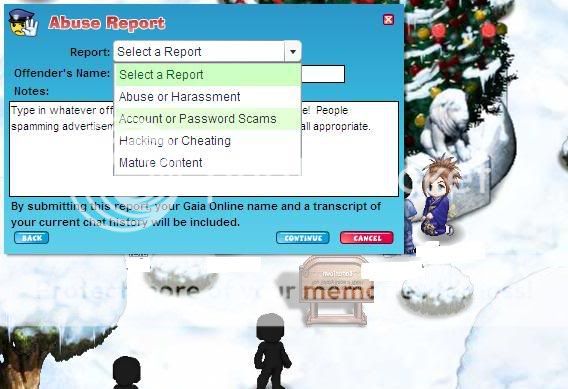
    Select the type of offense you wish to report for below.
    User Image

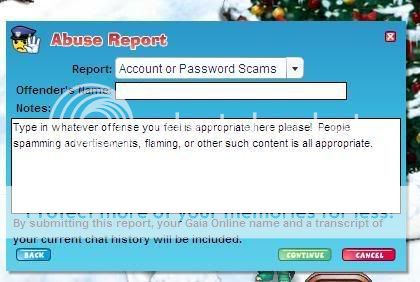
  • Step Four
    Self explanatory. Type in the offense and submit!
    User Image


~~~


Well! With the new and shiny report buttons, the old information on how to report has become kind of irrelevant. Screenshots are no longer necessary, of course. Nonetheless, leaving up the following as reference, and as this is still linked to by various other guides and resources.

  • If you do not have some kind of screenshot, we will not be able to take your report.
    If you suspect that a situation is turning into any of the above, please take screenshots of anything that seems important. It's hard to specify, as each situation is unique. You need to find the users in the area who are breaking the rules, and screenshot the rule-breaking. Here is what we are looking for in a screenshot:

  • Good Screenshots
    -have the reported user viewable with name clearly visible
    -show key points of text that exemplify the situation (where the abuse started etc)
    -are large enough that we can read them easily; Please save your images as .JPG, for a free host please use http://xs.to or www.tinypic.com

  • You can still send us screenshots that are missing some of those aspects, but this is what we'd prefer.

  • Good Reports should...
    Include a screenshot, as well as a text transcript of the entire incident starting a little before the incident begins, and end when it ends. This means that the text in the screenshots should be included in this text transcript.

    If the conversation is exceptionally long please point out specifically which quote or quotes you feel are the most reportable. It makes it a lot easier for us to determine what needs attention.

    For those who might be wondering how to capture longer conversations, or how to find what someone said in the past: if you click the icon to the left of the text input you can see the chat history - you can scroll and view the entire history from the time you entered that screen. Copying and pasting the rest as a dialogue without a supporting screenshot is perfectly acceptable, as long as we have evidence of the main transgression.

  • Please note that actions are next to impossible to document, so all reports should have text in them.
    Simply getting a single screenshot of a user supposedly stalking you or doing inappropriate things is something we cannot act upon without more concrete evidence.

  • If you can, please link us to the profile of the user you are reporting. This just helps us if they change their name. If you can't find them, that's okay. This is something that makes our job necessary but is not in any way required.

  • When you have all of the above, please compile them in 1 PM to any online moderator and we'll get on your case right away. 3nodding


If you do not know how to take a screenshot and need to, please read on.

Aged Elocutionist

8,900 Points
  • Tipsy 100
  • Elocutionist 200
  • Inquisitor 200
How to screen capture with Microsoft (MS) Paint!

Courtesy of Sky Render:

The first step is to go to the page you want to capture, such as a forum page or a multiplayer chat.

Next you need to find and hit the Print Screen key. It will be to the right of the F12 key. (If you only want to copy your internet browser window, press ALT + PRINT SCREEN. Make sure you are looking at your browser when you do this.)

User Image - Blocked by "Display Image" Settings. Click to show.

Next go to your Windows Start Menu and find the accessories folder, and then click on the Paint icon.

User Image - Blocked by "Display Image" Settings. Click to show.

This will open up MS paint. Now all you have to do is paste the image onto the program. You can do this either by pressing CTRL + V or by going to the Edit menu at the top and selecting Paste.

User Image - Blocked by "Display Image" Settings. Click to show.

Doing this should paste your desktop image onto the screen. Here is an example.

Click HERE for example.

Next you need to save it. Go to the File menu at the top and select Save As...

User Image - Blocked by "Display Image" Settings. Click to show.

At the top, you can choose what folder to save it in. The bottom part is very important, though. Make sure you save your picture as a .JPEG or .JPG!! Do not use BMP!! It is okay to submit a screenshot in a .bmp format, however, if it is too large, certian image hosts (such as photobucket) will shrink it, and we won't be able to read it.

User Image - Blocked by "Display Image" Settings. Click to show.

Now you are done saving your screenshot! Upload it to photobucket.com or http://xs.to or other image hosting site and then include the link to that image in your report. Photobucket shrinks virtually all .bmps, so if you saved your screenshot as a .bmp we HIGHLY RECOMMEND that you upload it at http://xs.to so that we are able to read it and process your report.

Courtesy of Marius_Th:

How to screen capture with MacOS!


It's really simple actually, just press "Command - shift - 3" (Command, also known as the apple key for the picture of the apple it holds) and a picture of your screen will automatically appear on the desktop, depending on the version of your OS this might be either a 'picture' file type (on pre-OSX computers), a PDF file type (I think, on panther), or a PNG one (with latest OS 10.4 Tiger)

Also, depending on the key's you press you can also make a shot of a specific window or a specific area, which will then appear as pictures on your desktop in the same way as a screenshot would

Here are the combinations:

"Command - Shift - 3" = Screenshot to file
"Command - Control - Shift - 3" = Screenshot to clipboard
"Command - Shift - 4" = Area Shot to file
"Command - Control - Shift - 4" = Area Shot to clipboard
"Command - Shift - 4" + "Spacebar" = Window shot to file
"Command - Control - Shift - 4" + "Spacebar" = Window shot to clipboard


And in case of wondering, the command key is the one with the apple, and control is the 'ctrl' key, and shift is the one with a white arrow.

Thanks to Sky Render for letting us use his screenshot guide which can be found in entireity here: ]http://www.gaiaonline.com/guilds/viewtopic.php?t=749789

Quick Reply

Submit
Manage Your Items
Other Stuff
Get GCash
Offers
Get Items
More Items
Where Everyone Hangs Out
Other Community Areas
Virtual Spaces
Fun Stuff
Gaia's Games
Mini-Games
Play with GCash
Play with Platinum